


The InfrOS Blog
Meet InfrOS at AWS re:Invent 2026 in Las Vegas

InfrOS is excited to be exhibiting at AWS re:Invent 2026 in Las Vegas!
We'll join the global cloud community to talk about how to build better cloud systems, cut costs, and keep them secure and reliable.
Make the Whole Thing Work at Booth #1387
Cloud architecture is complicated enough. Come have some fun at our booth:
- Pull the lever: Set our Rube Goldberg machine in motion and win a prize.
- Enter our daily raffles: Get a chance to win even bigger prizes.
- Meet the team: Chat with us and see InfrOS in action with a live demo.
Meet Our Team
Our founders and team members will be at the event to meet cloud architects, engineering leaders, and organizations looking to improve their cloud infrastructure:
- Naor Porat, Co-founder and CEO
- Harel Dil, Co-founder and CPTO
- Guy Brodetzki, General Manager - North America
- Omer Shafir, Head of Business Operations
- Anthony Picardi, Executive Director of Sales
- Nadav Dolin, Head of Platform
- Omri Golding, Customer Success Manager
Schedule a Meeting with Us
We'd love to connect! Stop by for a quick chat or book a meeting in advance to see InfrOS in action.
See you in Las Vegas!
Meet InfrOS at KubeCon + CloudNativeCon North America 2026
InfrOS is heading to KubeCon + CloudNativeCon North America 2026!
We'll join the global cloud community to talk about how to build better cloud systems, cut costs, and keep them secure and reliable.
Make the Whole Thing Work at Booth #360
Cloud architecture is complicated enough. Come have some fun at our booth:
- Pull the lever: Set our Rube Goldberg machine in motion and win a prize.
- Enter our daily raffles: Get a chance to win even bigger prizes.
- Meet the team: Chat with us and see InfrOS in action with a live demo
The Best Seats aren't at KubeCon
Join InfrOS on November 11 for an NBA game in our private skybox as the Utah Jazz take on the Orlando Magic. It's a chance to catch the game, meet fellow attendees, and spend time with the InfrOS team away from the conference floor.
Meet Our Team
Our team will be available throughout the event to discuss your infrastructure challenges and demonstrate the InfrOS platform.
Here's our team attending the event:
- Naor Porat, Co-founder and CEO
- Harel Dil, Co-founder and CPTO
- Guy Brodetzki, General Manager - North America
- Omer Shafir, Head of Business Operations
- Anthony Picardi, Executive Director of Sales
Let's Meet
Have an infrastructure challenge you'd like to discuss? Stop by our booth or schedule a dedicated meeting with our team.
See you in Salt Lake City!

9 Best Infrastructure Automation Tools for Cloud Engineering Team

Most cloud teams are already using cloud automation. There's Terraform in one repo, Ansible playbooks in another and a CI pipeline ties them all together. The problem is that "infrastructure automation tools" cover such a diverse range of use cases that it’s hard comparing them directly. In this blog post we’ll review 9 such tools, that actual task each one solves, and the niche it occupies. InfrOS is our product hence we will list it first, but we made sure to be fair in reviewing the rest. And also, we'll be upfront about our view - most cloud teams have too many tools stitched together, and we believe fewer is better.
Key Takeaways
- Infrastructure automation covers provisioning, configuration, orchestration and, more recently, architecture decisions.
- Terraform, OpenTofu, Pulumi and CloudFormation build infrastructure. Spacelift and env0 are infrastructure orchestration tools that run and govern those builds.
- Almost every tool starts after someone has already picked the architecture. InfrOS works on that earlier step.
- Most teams juggle too many tools. The fewer tools you work with, the fewer handoffs where things break.
What Counts as Infrastructure Automation
Infrastructure automation, for the purposes of the list, refers to software that performs a step within the process of creating, configuring, or maintaining an infrastructure component in an automated way instead of a manual one. This includes IaC, configuration management, the process of running and approving changes, and policy enforcement. General CI/CD systems like GitHub Actions or Jenkins were excluded because they belong to a separate category - they could run Terraform, but wouldn't know what infrastructure is. The same is true about monitoring solutions that merely point at broken parts of an infrastructure but don't fix it.
Automating a Decision Is Not the Same as Automating Deployment
The vast majority of tools perform an action according to the plan - you decide which cloud, regions, database, networking design and redundancy level you need, and the tool implements it. This is good, but the tool doesn't care whether your design was right or wrong. If your architecture costs you twice as much as it needs to, or collapses after region failure, Terraform will build it anyway.
A subset of these tools actually creates the design. They consider your requirements, contrast various architectural options and highlight the trade-offs in terms of costs, performance, resilience, and compliance before any implementation takes place. This is important because an architecture design mistake can easily be corrected on the whiteboard but would be very costly once implemented. For more details check out this blog post about shift-left cloud infrastructure design.
The 9 Best Infrastructure Automation Tools
With that split in mind, here's each tool, what it automates, how it deploys and who it fits.
1. InfrOS
InfrOS covers the entire cycle in one single package. It first helps to identify your infrastructure as well as requirements. This is followed by creation of different architectural options for you and analysis of them based on cost, performance, resiliency, and compliance. Before making any choice, it simulates the behavior of all options. Thus, you will be choosing based on facts rather than guesswork. Finally, after selecting one option, InfrOS helps to generate infrastructure as code and deploy the same. It will keep monitoring the live environment to inform you about better options whenever available. We call this Evolving Architecture™.
Recommended for: Cloud teams working in one or multiple clouds who seek a single solution for their design, validation, IaC and ongoing assessments.
2. Terraform
Terraform remains the default choice for most teams, and deservedly so. Describe infrastructure in HCL files, execute the plan to see the changes to be done, and then apply those changes. With hundreds of providers, it can connect to pretty much any cloud or SaaS APIs. Nearly all Terraform automation done at scale happens either via HCP Terraform or a third party orchestrator which provides capabilities of remote executions and state management.
Best for: Pretty much any team that starts with IaC, especially in the context of multiple clouds.
Watch out for: HashiCorp put Terraform under Business Source License in 2023. HashiCorp got acquired by IBM recently. For most of us, nothing much changed, but for some companies, a fully open source option became preferable.
3. OpenTofu
OpenTofu is the open-source fork of Terraform, created after that license change and now run under the Linux Foundation. Same HCL, same providers, very similar CLI, so moving over is usually a small job. It has also added features of its own, like built-in state encryption.
Best for: Teams that want the Terraform workflow with an open-source license and community governance.
Watch out for: The two projects are slowly drifting apart, so features don't always match.
4. Pulumi
Pulumi allows for writing infrastructure using real programming languages such as TypeScript, Python, Go, C# and Java. This implies usage of loops, functions and unit testing instead of configuration language. It still operates through the desired state at its core meaning that you get to see the preview of each change before it is deployed.
Good for: Teams with a lot of developers willing to write code instead of learning HCL.
Keep in mind: With power comes increased ability to write messier infrastructures. Having a good system of code reviews in place is crucial.
5. AWS CloudFormation
AWS CloudFormation is AWS’ own IaC solution. Using YAML or JSON templates AWS deploys and updates your infrastructure as a stack with rollback upon failure. Service itself is free but you have to pay for the resources it builds.
Good for: Teams which only use AWS and are interested in staying within their tooling ecosystem.
Keep in mind: It's AWS-only. The moment you start deploying your infrastructure to other clouds, you'll need another tool.
6. Ansible
Ansible manages configurations of running servers. You craft playbooks using YAML format, and then Ansible connects via SSH to deploy packages, manage settings, and provision applications. There’s no agent involved, which makes the whole process straightforward.
Best for: Operations teams managing dozens of VMs, on-premise servers or networking devices. Usually used together with Terraform, where Terraform provisions and Ansible configures.
Be aware of: Ansible is not good with monitoring state of cloud resources, and therefore it’s not the best choice as a primary infrastructure provisioning solution.
7. Spacelift
Spacelift is one of those infrastructure orchestrators that are sitting on top of your IaC. It allows running Terraform, OpenTofu, Pulumi, CloudFormation, Ansible, and Kubernetes workloads directly from your Git repositories. On top of it, it provides policies in code through Open Policy Agent, approvals, drift management and stack dependencies.
Best for: Platform teams with multiple stacks and multiple contributors that need some guardrails.
Be aware of: It’s one more platform to learn and use. Teams with only a few stacks probably don’t need it yet.
8. env0
Similar in concept to Spacelift but focusing more on developer self-service and cost optimization, env0 allows platform teams to release approved templates for use by developers who build environments from those templates, with cost information added by env0 prior to deployment. If your concern is cloud governance, we've covered cloud governance tools for engineering teams before.
Best For: Organizations where developers should be able to spin up their own environments without giving them access to everything.
Beware: Like Spacelift, this is worth its weight in gold at scale.
9. Crossplane
Crossplane is Kubernetes-as-a-control-plane for cloud infrastructure. Resources are defined as Kubernetes objects and managed through reconciliation (even when manual changes have been made), allowing platform teams to define APIs for themselves as a sort of wrapper, like a "database" object that handles all the cloud configuration under the hood.
Best For: Platform engineering teams who know their way around Kubernetes well.
Beware: This one's quite steep for those just starting with Kubernetes.
Tools Compared at a Glance
Here's how all nine line up on the same criteria.
A few things jump out. Four of these tools (Terraform, OpenTofu, Pulumi and CloudFormation) do basically the same job with different languages and licenses, so you only need one of them. Spacelift and env0 only make sense once you have one of those four. And InfrOS is the only one that covers the steps before, during and after provisioning. So the real question isn't which tool is best. It's how many tools you actually need.
How These Tools Fit Together in One Pipeline
Consider the traditional pipeline to have four tiers. The first one is the decision tier where you select the architecture. The second is the definition tier where the architecture gets converted into code using Terraform, OpenTofu, Pulumi, or CloudFormation. Then, there is the orchestration tier where Spacelift or env0 executes the code with policy enforcement and approvals, or Crossplane does the same within Kubernetes. Finally, there is the configuration tier where Ansible configures the servers and applications.
And that means four tools, four vendors, and four handoffs – and every single handoff becomes another point of failure. Instead, InfrOS uses a different approach, encompassing the decision-making, the IaC itself, the validation process and the monitoring within one loop, making it possible for you to remove quite a few elements from the stack rather than keeping it all running. This is end-to-end cloud automation, spanning design and live operations. Looping is important here because the process does not stop at deployment. Workloads evolve, pricing changes, new requirements come up – and an architecture that was perfect last year may no longer work.
Keeping it in shape is an ongoing job, which our guide to cloud infrastructure optimization best practices covers.
FAQ
What is infrastructure automation?
It's the use of software for performing the tedious tasks of creating and managing the infrastructure. The tasks include coding of the infrastructure, provisioning of cloud resources, server configurations, approvals and policy enforcement. This aims at improving the speed, repeatability, and accuracy of change. More recent automation technologies extend the process of automation right from the stage of architectural designs to determine the best architecture options.
What is the difference between automation and orchestration?
Automation is getting one task done without a person, like creating a database with a single Terraform apply. Orchestration is coordinating many automated tasks into one flow, in the right order and with the right checks. Think provisioning, then a policy check, then an approval, then configuration. Spacelift and env0 are infrastructure orchestration tools, while Terraform and Ansible are mostly automation. Once things grow, you usually need both.
Do these tools replace Terraform?
Automation involves getting a single task completed without human intervention, such as building a database through a single apply in Terraform. On the other hand, orchestration involves managing all the automated tasks together as part of one workflow, in order and with the proper checks. For example, provision, policy check, approval, and configuration. Env0 and Spacelift are examples of infrastructure orchestration tools, whereas Terraform and Ansible are more automation tools.
Which infrastructure automation tools suit small teams?
Keep it simple. You typically need one infrastructure-as-code tool for a small group, such as Terraform, OpenTofu or Pulumi, that operates within the CI pipeline you’re already using. CloudFormation will do the job just fine if you're only working in the AWS environment. Orchestration platforms and Kubernetes tools like Crossplane are more likely to give you return value later down the line when you have many stacks.
How do you measure the return on infrastructure automation?
Let's start from things that are quantifiable. Measure the time that is required to deploy a change, the number of deployments that failed, the amount of time spent handling manual tickets, and how frequently drift occurred. In case of architecture level automation solutions, let's not forget about comparing cloud costs to some kind of baseline and counting the number of designs that were avoided after the go live.
Our post on a FinOps cost optimization agent shows one way to tie automation to real cost numbers.
About InfrOS
InfrOS assists cloud teams in choosing what to build, validating that decision prior to production, and adapting as needed going forward.
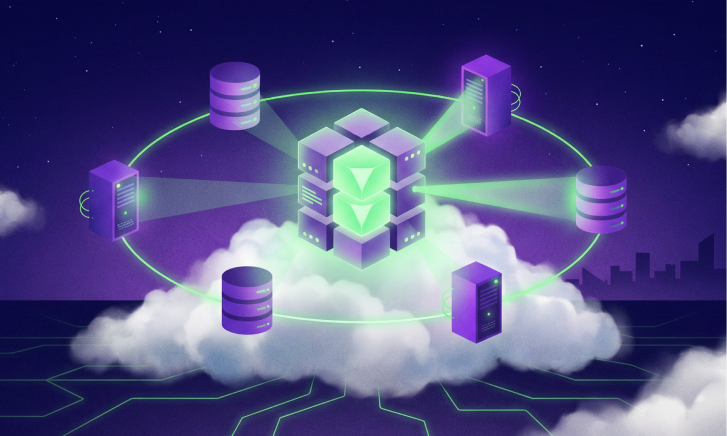
Infrastructure for Hybrid LLM Agent Deployments: Architecture Patterns for Production AI

AI agents are moving from experiments into production. They search internal knowledge, call APIs, write to databases, trigger workflows, and make decisions based on data pulled from many systems. That makes them far more useful than a traditional chatbot, and far harder to run reliably.
The reason is that an agent is not just a model behind an API. A production agent leans on a language model, databases, vector stores, external APIs, GPUs, identity systems, and internal apps. Some of that runs in the cloud, some has to stay on company servers. So the real question is not which model to use. It is where each part runs, how the pieces talk, what happens when one fails, and how it all holds up as usage grows. The architecture decisions around an agent matter more, and last longer, than the model you pick, so the time to make them is before anything is built. That is what building infrastructure for hybrid LLM agent deployments comes down to.
Key Takeaways
- Planning ahead matters more than the AI tools you pick. A strong model on a poorly planned architecture still ends up unreliable and expensive.
- AI agent infrastructure is not like normal app infrastructure. A single agent request can search a knowledge base, call several tools, hit multiple data sources, and invoke the model more than once. So instead of a fixed request-and-response path, you have a system that leans on models, data, networks, security, and many services all at the same time. That creates demands around latency, availability, observability, and cost that a standard web app never has to deal with.
- Hybrid deployments keep sensitive workloads on your own infrastructure while using cloud services where they make sense, but they add real complexity.
- Testing architecture choices before deployment prevents expensive redesigns later.
Why AI Agents Need Different Infrastructure
A normal app follows a predictable path. A user sends a request, the app reads or writes some data, and sends back a response. An agent is far less predictable.
Ask an agent to help investigate a customer issue and it might search a knowledge base, query a database, call an internal API, ask the model to reason over the results, decide it needs another tool, call that too, then answer and log the whole thing. Every step adds a dependency.
That changes the llm infrastructure requirements for production. The infrastructure has to support the model and everything around it: latency, availability, where sensitive data is allowed to go, what the agent can access, how it scales to thousands of users, what each interaction costs, and whether the team can see why it slowed down or failed. A prototype runs fine on a single endpoint and a laptop. Production has to account for all of it.
What "Hybrid" Means Here
Hybrid just means some of the system runs in the cloud and some runs on your own servers. Teams do this for a few reasons.
Sometimes it is about data. A financial firm might keep customer records in its own environment, let the agent pull them locally, and send only the needed context to a cloud model. Sometimes it is about the split between apps and models, where existing apps and databases stay on internal servers while model inference runs in the cloud and the agent connects the two. And sometimes it is about sensitivity, where routine work runs in the cloud and the most sensitive jobs stay on dedicated hardware.
The thing to remember is that hybrid is not automatically better. It adds networking, security, and operational complexity, so it should be a deliberate choice, driven by what the workload actually needs.
Common Setups Companies Use Today
There is no single right architecture, but a handful of patterns show up again and again:
- Cloud agent, cloud models. Everything runs in the cloud. Simplest to deploy, with elastic capacity and managed services, but costs climb fast as agents make more model and tool calls.
- On-prem agent, cloud inference. Orchestration and sensitive data stay internal while the model runs in the cloud. Good for control, but watch network latency and what data gets sent out.
- Hybrid inference. A small local model handles routine requests and a larger cloud model takes the hard ones. Balances cost and privacy, but routing and capacity planning get trickier.
- Cloud agent, private data. The agent runs in the cloud but critical databases stay on-prem behind controlled connections. Useful when internal systems can't easily move.
- Many environments. Big enterprises end up with agents across several clouds, regions, and internal systems. The job shifts from deploying one app to keeping a constantly changing architecture understandable.
Why Planning Ahead Beats Fixing Problems Later
This is where most of the cost hides. Building the first version fast and worrying about architecture later works fine while you are experimenting. It gets expensive in production.
Take an agent handling 100 requests a day. Nobody notices that each one crosses three network boundaries, hits two external services, and calls an expensive model. At 100 requests it is nothing. At 100,000 it is an architecture problem. Resilience works the same way: if the agent quietly depends on a single region, model provider, or database, that one failure takes it all down, and fixing it later means reworking networking, data flows, compute, and security at once.
Architecture decisions compound, so it pays to compare options before you commit: how cost behaves as usage grows, where latency builds up, which components are single points of failure, and what happens when a model endpoint goes dark. This is the shift-left idea applied to infrastructure. Instead of finding the problems after launch, you validate the design before committing to it. We go deeper on this in Shift-Left Cloud Infrastructure Design.
Planning ahead is not about predicting five years out. It is about making the tradeoffs visible before they get expensive, so the choice is deliberate instead of just whatever was easiest to ship first.
Planning for AI Training Infrastructure
Inference is only half the story. Teams that train or fine-tune models face another set of needs, and llm training infrastructure can call for serious GPU capacity, fast networking, big datasets, and careful scheduling. Even here, more hardware is not the fix. What matters is utilization. A common pattern is to keep dedicated GPUs for steady, high-volume work and rent cloud GPUs for occasional bursts. Underused dedicated hardware is just as wasteful as sloppy cloud spend, so plan around real workload behavior, not the theoretical maximum.
FAQ
What makes AI agent infrastructure different from regular app infrastructure?
The big difference is predictability. A normal app runs a fixed path. An agent decides what to do at runtime, so one request may branch across tools, data sources, and repeated model calls. Planning has to cover that variability, plus the latency, security, observability, and cost it brings.
What do companies need to plan for before running AI agents in production?
Plan for model capacity, data access, networking, security, latency, availability, observability, scaling, and cost. Map the critical dependencies and failure scenarios too. The most important step is understanding how the whole architecture behaves under real workloads, not just testing each component on its own.
Can a hybrid setup slow down AI agents?
Yes. Every hop between environments adds latency, especially when an agent keeps moving data between on-prem systems and the cloud. A good hybrid design limits this by keeping components that talk to each other often close together and cutting out unnecessary data movement.
How do companies plan ahead for training large AI models?
Start with workload size, GPU needs, training frequency, storage, networking, and utilization. Then compare dedicated infrastructure, cloud capacity, or a mix. The aim is enough compute for the workloads you actually run, without paying year-round for hardware that mostly sits idle.

How I Built a FinOps Cost Optimization Agent on Amazon Bedrock AgentCore to Cut a Company’s AWS Bill

The Business Challenge
A CIO at a large enterprise reached out with a problem I hear often. Their cloud costs were climbing, but they had no budget to hire a dedicated FinOps team or to pay for one of the expensive SaaS cost-management platforms on the market.
Their engineering, cloud operations, and SRE teams needed a simple way to understand where the money was going, spot optimization opportunities, and get clear recommendations, without anyone having to become a FinOps specialist first. The request was direct:
“Can we build an AI assistant that understands our cloud environment, answers questions about our costs in plain language, and tells us how to reduce spending whenever the teams need it?”
That question is what led me to build a Cost Optimization Agent on AWS: a conversational interface that lets any engineer ask about cloud spend, see where it is going, and get specific actions to bring it down.
What I Built
The agent answers questions like “Are my costs higher than usual this month?” or “How can I reduce my Lambda spend?” and replies with an analysis and concrete recommendations. It is a single-agent design built from a few clear parts:
- Claude Sonnet, served through Amazon Bedrock: the model that interprets the question and reasons over the cost data it gets back.
- Amazon Bedrock AgentCore Runtime: hosts the agent in production and runs its reasoning-and-tool-selection loop, with auto-scaling, session isolation, and monitoring handled for me.
- Amazon Bedrock Guardrails: content filtering on both the user input and the model output that keeps conversations inside the FinOps scope, blocks prompt injection, and prevents sensitive data from leaking.
- A set of cost-intelligence tools: each function calls an AWS cost or monitoring API: Cost Explorer, AWS Budgets, Amazon CloudWatch, and AWS Compute Optimizer.
- A production front door and supporting services: Amazon API Gateway and Amazon Cognito for access, Amazon DynamoDB for conversation context, and Amazon SNS for proactive alerts.
I started from the AWS reference implementation in the awslabs agentcore-samples repository, which gave me the core agent and its cost tools. On top of that, InfrOS — a platform that turns requirements in any form (a simple brief, PRD, design doc, TF, HLD diagram etc.) into a priced, validated cloud design — worked out the production architecture around it, adding the pieces a real deployment needs:
- The API Gateway and Cognito front door
- DynamoDB session persistence
- SNS alerting
- Compute Optimizer as a rightsizing source
so the result is a production setup for the customer rather than the sample running as is. The architecture behind it was designed, priced, and validated with InfrOS: it scored the component options across the priority dimensions, priced each one across on-demand, reserved, and spot, then generated the IaC and emulated it in a sandbox, benchmarking the design against the requirements before any of it reached a real AWS account. What would otherwise take an architect weeks came back as a validated, deployable blueprint in a single session.
Architecture
The system runs in us-east-1 and is organized into three layers. The first is the user interaction layer: engineers type their questions into a lightweight web chat UI whose requests arrive through Amazon API Gateway, where Amazon Cognito authenticates the user, Amazon DynamoDB stores and retrieves the conversation context so sessions persist, and Amazon SNS delivers proactive alerts. The second is the agent core: AgentCore Runtime hosts the agent and runs its reasoning loop with the Claude Sonnet model. The third is the cost-intelligence tools, which read from AWS Cost Explorer, AWS Budgets, Amazon CloudWatch, and AWS Compute Optimizer. Rather than running in the organization's management (payer) account, which AWS recommends reserving for org-wide administration rather than for hosting workloads, the agent runs in a dedicated FinOps tooling account. That account is registered as the delegated administrator for AWS Compute Optimizer and is granted scoped, read-only access to organization-wide Cost Explorer data, so it still reads consolidated cost and rightsizing data across every linked account at the organization level without placing an internet-facing workload in the most sensitive account in the organization. AWS Budgets sits in the global scope rather than the Region, since budgets are account wide.
Amazon Bedrock plays two distinct roles in the design, worth separating because the service name is the same in both. One role is Guardrails, filtering the conversation on the way in and on the way out; the other is the model endpoint that serves Claude Sonnet for the agent’s reasoning. Same service, two different jobs.
The agent itself is inexpensive to run about $479 a month against the customer’s $1,500 budget. For a FinOps tool, the interesting detail is that roughly 86% of that ($412) is the Claude Sonnet inference, not the surrounding infrastructure. The model is the cost to watch, which is a point I come back to under future work.
Architecture Decisions
Each part of the design was a deliberate choice that InfrOS evaluated and scored against the priority profiles, and the trade-offs are worth spelling out. Here is the reasoning behind the main ones.
Why AgentCore Runtime?
The customer wanted a production agent, not a prototype, but had no appetite for managing the infrastructure under it. AgentCore Runtime handles auto-scaling, monitoring, and session isolation, and it deploys through the AgentCore starter toolkit, which provisions the runtime, the IAM execution role, and the container image for you. Session isolation matters when several engineers query cost data at once meaning each conversation stays separate. Using AgentCore Runtime, rather than the managed Agents for Amazon Bedrock feature, kept the agent code under our control while still getting managed hosting.
Why Claude Sonnet?
This agent leans on two things: understanding loosely worded cost questions in plain English, and reasoning over structured billing data to produce a clear recommendation with the trade-offs spelled out.
Claude Sonnet is strong at both, and its reliability at choosing the right tool from the catalog kept the loop accurate. Serving it through Amazon Bedrock also kept the model inside the customer’s AWS account and security boundary, which was a requirement.
So why Guardrails?
A cost assistant should only ever talk about costs. Amazon Bedrock Guardrails enforce that topic boundary on both the user input and the model output, block prompt-injection attempts, and stop sensitive data such as access keys or PII from appearing in a response. Putting safety in a managed, declarative layer kept it separate from the agent logic and applied it consistently to every query.
How It Works
A request follows the same numbered path every time, shown end to end below.
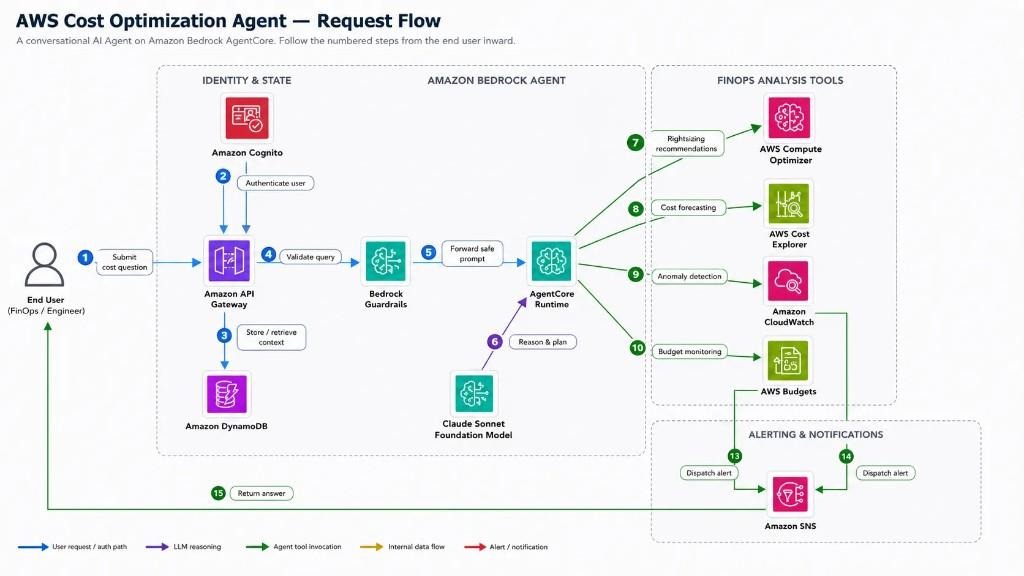
- An engineer submits a cost question through Amazon API Gateway.
- Amazon Cognito authenticates the request.
- DynamoDB stores or retrieves the conversation context, so a follow-up keeps its thread.
- Bedrock Guardrails validate the query, dropping anything off-topic or unsafe.
- The safe prompt is forwarded to AgentCore Runtime, where the agent reasons with the Claude Sonnet foundation model and decides which tools to call:
- Rightsizing recommendations from AWS Compute Optimizer.
- Cost forecasting from AWS Cost Explorer.
- Anomaly detection from Amazon CloudWatch.
- Budget monitoring from AWS Budgets.
- When something needs attention, CloudWatch and Budgets dispatch alerts through Amazon SNS.
- The synthesized answer is returned to the engineer.
The agent does not run a fixed script; the model chooses which tools to call based on the question and may call several before answering.
The four cost tools map directly to AWS APIs:
- Cost Anomaly Detection: unusual spending patterns and spikes, detected with Amazon CloudWatch anomaly detection over cost metrics published from Cost Explorer, with alerts dispatched over SNS.
- Cost Forecasting and Trend Analysis: projected spend and historical trends from AWS Cost Explorer.
- Service Cost Breakdown: spend by service, account, and resource, combining AWS Compute Optimizer rightsizing data with Cost Explorer to flag unused, underutilized, and oversized resources.
- Budget Monitoring and Status: utilization and overrun forecasts from AWS Budgets, with alerts dispatched over SNS.
Infrastructure and Deployment
The agent deploys through the AgentCore starter toolkit, wrapped by the repository’s scripts. After cloning the reference repository and installing dependencies, there are three steps, test locally, deploy, then test the deployed agent against live cost data:
The deploy step calls the starter toolkit, which builds the container image, creates the IAM execution role and ECR repository, and registers the runtime so the agent itself does not need a hand-written infrastructure module. The supporting resources around it (API Gateway, Cognito, DynamoDB, SNS, the Guardrail, and the budget) are defined in Terraform so they are version-controlled and repeatable. The Guardrail, for example, is a short block that also blocks prompt-injection attempts and stops AWS keys from ever appearing in a response:
The Outcome
Before any production rollout, we ran the agent against the customer’s dev and test AWS environment three linked accounts with about $1,012 of spend over the previous 30 days (a window that straddled April and May) to see what it would find. This is the summary it returned:

In a single run it flagged a $115.38 anomaly (EKS extended support, billed April 19–26) and forecast May at $1,023.76, up 13.3% on the full April calendar month of about $904. The $1,012.38 headline is the trailing-30-day total, which runs higher than the April calendar month because that window also caught the EKS spike. Against that roughly $1,012 monthly run rate it identified $369 a month in savings: a 36.5% reduction worth about $4,428 a year.
To be precise, that is spend the agent recommended cutting rather than money already removed, and on a roughly $1,000-a-month sandbox the $4,428-a-year figure is a proof of capability more than an ROI case: at $479 a month the agent would cost more to run than that. What mattered in the pilot was that it surfaced this much on a tiny environment in a single run, as a summary panel alongside its conversational answers. The ROI argument sits with the production rollout below, where the same engine runs against a far larger bill.
On the strength of that pilot the customer moved the agent into production. Within the first few months, the changes the engineers acted on added up to roughly a 12% reduction in the monthly bill. A good part of that came from one early find: an oversized Amazon RDS instance that Compute Optimizer flagged for rightsizing, alongside a handful of EC2 instances the team had spun up for a project and left running for months after they stopped using them.
The agent surfaced both in response to a plain question about where the months spend was going, the kind of thing that usually hides in a billing console until someone goes looking.
Just as important was the change in who could ask cost questions and how fast. Engineers no longer waited on a central team or a paid dashboard; they asked in plain language and got an answer with a recommended action, so cost awareness happened during day to day work instead of in a monthly review. Against the production bill, the roughly $479-a-month agent cost a small fraction of the 12% it helped remove, and it met the original constraint of meaningful FinOps coverage without a dedicated team or a third-party platform, which was the whole reason the CIO called in the first place.
Further Improvements and Architecture Vision
The clearest piece of the architecture vision is memory. Today Amazon DynamoDB stores and retrieves the conversation context, which means I am managing session state, retrieval, and expiry myself. I plan to replace it with Amazon Bedrock AgentCore Memory, which provides short-term memory for the active session and long-term memory that persists across sessions as a native capability of the runtime already hosting the agent. That removes a hand-managed store and lets the platform handle what it is built for the same reasoning behind choosing AgentCore Runtime in the first place. DynamoDB would only stay if there were structured, non-conversational records worth keeping.
Conclusion
The Cost Optimization Agent took a request that usually ends in a hire or a software purchase and answered it with a small, focused build instead. Claude Sonnet through Amazon Bedrock supplies the reasoning, Bedrock Guardrails keep it safe and on topic, AgentCore Runtime hosts it and runs the tool loop, and a set of cost tools connect it to Cost Explorer, Budgets, CloudWatch, and Compute Optimizer with API Gateway, Cognito, DynamoDB, and SNS making it a real deployment. The pattern is reusable: give a model a clear set of narrow tools and a safe runtime, and you can put a useful assistant in front of a problem that used to need a whole team. And the build itself was just as lean: InfrOS turned what would have been weeks of architecture work into a single session, exploring and scoring the options and handing back a priced, validated, IaC-ready design.
9 Best Cloud Governance Tools for Engineering Teams in 2026
Key Takeaways
- Top pick for 2026: InfrOS. It's the only platform that enforces cloud cost governance before resources are provisioned, not after the damage is done.
- Cloud governance has moved from a compliance checkbox to a core engineering discipline. Teams that skip it face spiraling costs, configuration drift, and audit failures.
- The most effective cloud governance tools combine policy enforcement, cost controls, and multi-cloud visibility in a single workflow.
- An IT cost optimization framework built around shift-left governance can reduce cloud waste by up to 43% compared to reactive FinOps approaches.
- Engineering teams get the most value from governance tools that integrate directly into IaC pipelines and CI/CD workflows, not standalone dashboards.
Why Engineering Teams Can't Skip Cloud Governance in 2026
Cloud environments don't stay clean on their own. A team of five engineers can spin up hundreds of resources across AWS, Azure, and GCP in a single sprint. Without consistent guardrails, what starts as a well-structured environment becomes a tangle of untagged instances, orphaned storage volumes, over-permissive IAM roles, and unexplained line items on the monthly bill.
This is the core problem cloud governance tools exist to solve. And in 2026, the stakes are higher than ever.
Three forces are making governance non-negotiable. First, multi-cloud is now the default. Most engineering teams operate across at least two cloud providers, and maintaining consistent policies across different control planes, AWS Organizations, Azure Policy, GCP Organization Policies, requires tooling, not manual effort. Second, AI workloads are inflating cloud spend faster than any previous technology wave. GPU compute, large-scale inference, and data pipeline infrastructure don't forgive misconfigured autoscaling or missing budget alerts. Third, compliance requirements are getting stricter. GDPR, SOC 2, HIPAA, and industry-specific frameworks all demand audit trails, encryption enforcement, and access controls that only systematic governance can reliably deliver.
The engineering teams that treat governance as a one-time setup task will keep paying for it in post-deployment rework, surprise bills, and audit findings. The ones embedding governance tools into their daily workflows are shipping faster and spending less.
What Makes a Cloud Governance Tool Enterprise-Ready
Not every tool that calls itself a governance platform is actually built for engineering teams operating at scale. Here's what separates enterprise-ready cloud governance tools from the rest.
Automatic policy enforcement. The tool must enforce rules, not just report on violations. If a misconfigured resource can reach production because the policy engine only flags it after the fact, it's a monitoring tool, not a governance tool. Look for enforcement at the IaC level, in CI/CD pipelines, or at the cloud API layer before provisioning completes.
Multi-cloud support across AWS, Azure, and GCP. Single-cloud governance tools create blind spots the moment your team deploys anything outside that provider. A genuine enterprise solution applies consistent policies and visibility across all three major clouds from a unified control plane.
Granular cost alerting and budget guardrails. Cloud cost governance requires more than a monthly budget threshold. Effective tools provide per-service, per-team, and per-environment budget limits with real-time anomaly detection, so cost spikes surface within hours, not at month-end.
Enforced tagging standards. Tagging is the foundation of cost attribution, access control, and cleanup automation. An enterprise-ready tool makes tagging non-negotiable, resources that don't meet tagging requirements fail validation before they're deployed.
Drift detection. Infrastructure drifts from its intended state constantly. Governance tools need to continuously compare running resources against the declared baseline and surface deviations before they create security gaps or compliance failures.
Together, these capabilities create the foundation of an IT cost optimization framework that scales with engineering teams across AWS, Azure, and GCP. When governance is embedded early, teams can control spend, maintain compliance, and reduce operational overhead without slowing down deployments
9 Best Cloud Governance Tools for Engineering Teams in 2026
The tools below were selected based on depth of policy enforcement, multi-cloud coverage, IaC integration, and real-world impact on cloud cost governance. Each has a distinct strength and a clear use case. InfrOS is listed first because it's the only platform that addresses governance at the design stage rather than after deployment.
1. InfrOS
InfrOS approaches cloud governance from the direction most tools ignore: the design phase. Before a single resource is provisioned, InfrOS validates architecture candidates against cost targets, compliance policies, security requirements, and performance benchmarks, in a sandboxed emulation environment.
Key features:
- Pre-deployment architecture emulation and policy validation across AWS, Azure, and GCP
- Automated cost benchmarking with deterministic results before IaC is applied
- Production-ready Terraform generation with embedded compliance guardrails
- Continuous lifecycle optimization and drift detection after deployment
- Runtime feedback loop that feeds real-world performance data back into the next design cycle
Where most governance tools catch problems that already exist in your environment, InfrOS prevents them from being introduced in the first place. For teams building new infrastructure or migrating workloads, that shift-left approach is what drives the 43% average infrastructure cost reduction seen across InfrOS deployments.
2. AWS Control Tower + Service Control Policies (SCPs)
AWS Control Tower is the native governance layer for organizations running multi-account AWS environments. It sets up a landing zone with built-in guardrails and uses Service Control Policies to restrict what member accounts can and cannot do.
Key features:
- Centralized governance across AWS Organizations
- Pre-built guardrails for security, compliance, and operational baselines
- Account vending with consistent baseline configurations
- Integration with AWS Config for continuous compliance monitoring
Control Tower is the right choice for AWS-first organizations that need to govern a large number of accounts consistently. Its limitations show in multi-cloud environments, where it has no visibility outside AWS.
3. Azure Policy + Microsoft Defender for Cloud
Azure Policy lets teams define and enforce rules across Azure subscriptions and management groups. Combined with Microsoft Defender for Cloud, it provides continuous security posture assessment alongside policy enforcement.
Key features:
- Policy assignments at the subscription and management group level
- Built-in policy definitions for compliance frameworks including CIS, NIST, and PCI DSS
- Automatic remediation tasks for non-compliant resources
- Regulatory compliance dashboard with audit-ready reporting
For organizations heavily invested in Azure, this combination delivers deep governance coverage without additional tooling. Multi-cloud teams will need supplementary solutions for AWS and GCP workloads.
4. HashiCorp Sentinel (Terraform Cloud / Enterprise)
Sentinel is HashiCorp's policy-as-code framework built directly into Terraform Cloud and Terraform Enterprise. Policies are written in Sentinel's own language and evaluated against Terraform plans before apply runs, meaning violations are blocked before any infrastructure changes.
Key features:
- Policy evaluation at plan time, before any resource is provisioned
- Fine-grained enforcement modes: advisory, soft-mandatory, and hard-mandatory
- Native integration with Terraform's plan output for detailed violation context
- Support for cost estimation policies alongside security and compliance rules
Sentinel is purpose-built for teams that standardize on Terraform. It's one of the strongest options for embedding an IT cost optimization framework directly into IaC workflows, because policies run as part of the normal deployment pipeline.
5. Open Policy Agent (OPA) + Conftest
OPA is an open-source, general-purpose policy engine. Combined with Conftest, a wrapper that makes OPA easy to use against Terraform plans, Kubernetes manifests, and Dockerfile configs, it becomes a powerful, flexible governance layer that works across any CI/CD pipeline.
Key features:
- Policy written in Rego, a declarative query language designed for structured data
- Works against Terraform plans, Kubernetes YAML, Helm charts, and Dockerfiles
- Lightweight and CI/CD native, runs as a step in GitHub Actions, GitLab CI, or any pipeline
- Active open-source community with a large library of reusable policy examples
OPA is the right choice for teams that want maximum flexibility and don't mind writing their own policies. It requires more upfront investment than commercial solutions but has no licensing cost and integrates with almost everything.
6. Cloud Custodian
Cloud Custodian is an open-source policy engine from Capital One, designed for automated resource management and compliance across AWS, Azure, and GCP. It's particularly strong for cleanup automation, finding and acting on idle, orphaned, or non-compliant resources at scale.
Key features:
- Policy library covering hundreds of resource types across three major clouds
- Real-time event-driven enforcement via CloudWatch Events, Azure Event Grid, and GCP Pub/Sub
- Automated remediation actions: stop, delete, tag, notify, or quarantine
- Scheduling for off-hours workload management and cost reduction
Cloud Custodian fills a gap that policy-as-code frameworks often miss: the ongoing management of what's already running. It's a strong complement to design-time governance tools like InfrOS or Sentinel. See how it fits into a broader cloud cost management strategy.
7. Wiz
Wiz is a cloud security platform that gives engineering and security teams deep visibility into risk across multi-cloud environments. It's built around an inventory and relationship graph that maps every resource, identity, network path, and vulnerability in a unified view.
Key features:
- Agentless scanning across AWS, Azure, GCP, and Kubernetes
- Security graph that surfaces attack paths, not just isolated findings
- Built-in compliance frameworks with automated evidence collection
- Integration with CI/CD pipelines for shift-left security scanning
Wiz is the strongest option for teams where security posture and compliance evidence are the primary governance concern. It's not a cost governance tool, but its policy and compliance capabilities are enterprise-grade.
8. Spot by NetApp (CloudCheckr)
Spot by NetApp, incorporating the CloudCheckr platform, provides multi-cloud governance with a focus on cost visibility, compliance reporting, and resource optimization. It's widely used in managed service provider (MSP) and enterprise environments where accountability across business units matters.
Key features:
- Multi-cloud cost allocation with showback and chargeback reporting
- Over 500 best-practice checks across security, cost, and availability
- Reserved instance and savings plan management with utilization tracking
- Role-based access control for multi-team and multi-client environments
Spot is best suited for organizations that need governance reporting across complex account structures, particularly where different teams or clients are billed separately for their cloud usage.
9. Checkov (by Bridgecrew / Prisma Cloud)
Checkov is an open-source static analysis tool that scans IaC files, Terraform, CloudFormation, Kubernetes manifests, ARM templates, and more, before they're deployed. It's fast, developer-friendly, and integrates into any CI/CD pipeline in minutes.
Key features:
- Over 1,000 built-in checks for security and compliance across all major IaC frameworks
- Supports custom policies using Python or YAML
- Native integration with GitHub, GitLab, and Bitbucket for PR-level feedback
- Graph-based analysis to catch complex misconfigurations that simple rules miss
Checkov is the entry point for many engineering teams starting with cloud governance. It's free, fast to set up, and provides immediate feedback on common issues like public storage buckets, missing encryption, and overly permissive IAM policies. Pair it with a runtime governance tool for complete coverage across the infrastructure lifecycle.
How Cloud Governance Tools Support Cost Control and Compliance
Cloud cost governance and compliance aren't separate concerns, they run on the same underlying infrastructure: consistent policies, enforced tagging, and budget guardrails applied systematically across every environment.
In practice, cloud cost governance works in layers. The first layer is prevention: catching expensive or non-compliant configurations before they're deployed. This is where InfrOS, Sentinel, and Checkov operate, evaluating IaC and architecture designs against cost targets and policy rules before a resource ever runs. The second layer is enforcement: ensuring running environments stay within budget and policy bounds. Tools like Cloud Custodian, AWS Config, and Azure Policy handle this by continuously checking live resources and triggering automated remediation when violations occur. The third layer is visibility: giving engineering, finance, and leadership teams a shared view of where money is going and why. This is where cost allocation tools with tagging enforcement and showback reporting add value.
An effective IT cost optimization framework connects all three layers. It starts with design-time validation to prevent structural waste from entering production in the first place. It enforces tagging standards so every resource can be attributed to a team, environment, and business unit from day one. It sets budget thresholds at the service, account, and team level, with real-time anomaly alerts rather than monthly surprises. And it creates a feedback loop, runtime data flows back into the next architecture review, so the environment continuously improves rather than drifting toward waste.
The most common failure mode teams encounter is treating governance as a reporting exercise. Dashboards that show you what you spent last month are useful context. Policies that prevent overspending from happening in the first place are what move the needle. The best cloud cost optimization tools share a common characteristic: they make cost a constraint at design time, not a metric to be reviewed after the fact.
For compliance, the same principle applies. Running an audit after deployment to check whether encryption is enabled or public access is blocked is better than nothing. But policy enforcement in IaC pipelines, blocking non-compliant configurations from being merged and deployed, eliminates entire categories of audit findings before they occur.
FAQ
What is the difference between cloud governance and cloud management?
Cloud governance defines the rules, policies, and standards that determine how cloud resources should be used, who can deploy, what configurations are allowed, how costs are attributed. Cloud management is the operational work of running environments within those rules: provisioning, monitoring, scaling, and incident response. Governance sets the guardrails; management drives within them.
How do cloud governance tools work with IaC pipelines?
Most modern governance tools integrate as a step in CI/CD pipelines, evaluating Terraform plans, CloudFormation templates, or Kubernetes manifests before they're applied. Tools like Sentinel, OPA, and Checkov block non-compliant changes from merging or deploying. This shifts enforcement left, so violations are caught during code review rather than in production.
Can one tool enforce policy across AWS, Azure, and GCP?
Yes, tools like InfrOS, Cloud Custodian, OPA, and Wiz all operate across multiple cloud providers from a single control plane. Native provider tools (AWS Control Tower, Azure Policy, GCP Org Policies) are powerful within their own ecosystem but require separate configuration for each provider. Multi-cloud governance is best handled by platform-agnostic tools with native integrations across all three.
How do these tools help reduce cloud spending?
Cloud governance tools reduce spend by preventing waste before deployment and continuously enforcing policies after resources go live. They catch overprovisioned services, missing budget guardrails, and untagged infrastructure early, then automate cleanup and alerts so teams spend less time reacting to unnecessary cloud costs.
Enterprise Architecture Maturity Model: Stages, Criteria, and What to Do at Each Level
Key Takeaways
- An enterprise architecture maturity model gives organizations a structured way to assess how well their IT systems support business goals, and a clear path to improve.
- Most companies sit at Stage 2 or 3: they have some architecture documentation and standards, but decisions are still largely reactive, inconsistent, or siloed.
- Each maturity stage demands different actions. Describing the stages without prescribing what to do next is where most guides fall short.
- Cloud architecture decisions should be driven by your maturity level, teams at lower stages need to consolidate and standardize before pursuing complex multi-cloud strategies.
- InfrOS helps engineering teams act on their maturity stage by providing validated, pre-deployment architecture design, so every infrastructure decision is grounded in proven requirements rather than educated guesses.
What Is an Enterprise Architecture Maturity Model
An enterprise architecture maturity model is a structured way to assess how well IT systems and architecture decisions support business goals, and what needs to improve over time.
Organizations don’t manage technology with the same level of consistency or strategic intent. Some make infrastructure decisions reactively, one project at a time. Others operate with documented, governed architecture that guides every major investment. A maturity model maps that progression into defined stages.
Companies use it because “improve IT” is too vague to act on. A maturity model creates a clear baseline: where you are now, what gaps exist, and what actions move you forward. The result is stronger investment planning, better alignment between engineering and leadership, and a more practical roadmap for IT infrastructure transformation.
The 5 Stages of Enterprise Architecture Maturity and What to Do at Each Level
Maturity models vary in their exact terminology, but the underlying progression is consistent. Organizations move from ad hoc, undocumented decisions toward managed, strategically integrated architecture. Here are the five stages, what each one looks like from the inside, and, critically, what to actually do at each level.
Stage 1, Initial: What it looks like + what to do next
At Stage 1, there is no formal architecture practice. Technology decisions are made by individual teams or project managers without coordination. Infrastructure is built to solve immediate problems. Documentation, when it exists, lives in someone's head or a shared drive that no one maintains. Security and compliance are handled reactively. Costs are difficult to explain because no one has full visibility into what's running or why.
This isn't a failure state, it's a starting point that most organizations pass through. The problem is staying here too long.
What to do next: The priority at Stage 1 is visibility, not transformation. Start by taking inventory. Document what systems exist, what they do, who owns them, and what they cost. Don't attempt to redesign anything yet. Establish a small, cross-functional group responsible for architecture decisions, even informally. The goal is to stop making undocumented choices and start building a shared picture of the current state.
Stage 2, Developing: What it looks like + what to do next
At Stage 2, architecture documentation exists but isn't consistently maintained or used. Some teams follow standards; others don't. There may be an architecture function, a team or a few senior engineers with that title, but their influence on day-to-day decisions is limited. Cloud adoption is underway but fragmented: different business units use different providers, different tools, and different conventions. Costs are tracked at the account level but not attributed to teams, services, or business outcomes.
This is where a large proportion of mid-size enterprises sit. The documentation and the intent are there, but enterprise architecture integration into actual decision-making is weak.
What to do next: The priority at Stage 2 is standardization. Define and enforce a baseline set of conventions: naming standards, tagging requirements, approved cloud services, identity and access patterns. These don't need to be perfect, they need to be agreed upon and applied consistently. Introduce architecture review as a lightweight step in project intake, not a gate that slows teams down, but a checkpoint that surfaces alignment issues early. Begin connecting infrastructure spend to business units so cost ownership becomes visible.
Stage 3, Defined: What it looks like + what to do next
At Stage 3, the architecture function has real influence. Standards exist, are documented, and are largely followed. Architecture reviews happen before significant projects begin. There is a current-state inventory that's reasonably accurate. Cloud enterprise architecture decisions are made with awareness of the broader environment rather than in isolation. Compliance and security requirements are mapped to infrastructure, though enforcement may still be partially manual.
The main gap at Stage 3 is execution. Architecture is documented, but environments still drift as teams move quickly and changes bypass review.
What to do next: The priority at Stage 3 is closing the gap between design and reality. This means investing in tooling that detects drift, enforces policy in pipelines rather than after deployment, and connects architecture decisions to infrastructure code. Shift architecture review earlier, into the design and planning phase, not just the approval phase. Begin measuring architecture outcomes: deployment frequency, incident rates tied to architecture decisions, cost per service. These metrics build the business case for the next stage of investment.
Stage 4, Managed: What it looks like + what to do next
At Stage 4, architecture is quantitatively managed. Decisions are informed by data: utilization metrics, cost-per-unit economics, performance benchmarks, compliance dashboards. The gap between intended and actual architecture is tracked and systematically reduced. Enterprise architecture integration is real, business strategy and technology strategy are explicitly connected, and architecture decisions reference business outcomes rather than just technical preferences.
Cloud architecture at this stage is intentional. Multi-cloud or hybrid environments are governed deliberately, and infrastructure transformation projects begin with validated target architectures.
What to do next: The priority at Stage 4 is continuous improvement and automation. Architecture governance should be embedded in CI/CD pipelines so enforcement is automatic rather than manual. Begin building predictive capability: using cost and performance data to model the impact of architectural changes before they're made. Platforms like InfrOS operate in this mode, generating validated, benchmarked architecture designs before deployment so that every infrastructure change has a proven outcome attached to it. Teams at Stage 4 are ready to use this kind of tooling at full value.
Stage 5, Optimizing: What it looks like + what to do next
At Stage 5, architecture is self-improving. The organization treats its IT environment as a continuously evolving system: runtime feedback loops into the next design cycle, cost and performance data drives automated optimization recommendations, and architecture decisions are made with quantified confidence rather than professional judgment alone. Business and technology planning are genuinely integrated, the architecture roadmap and the business strategy are produced together, not reconciled after the fact.
Very few organizations operate consistently at Stage 5. It’s best treated as a direction rather than a fixed destination.
What to do next: The work at Stage 5 is sustaining and scaling. Governance models that work for a 200-person engineering team may not hold at 2,000. Architecture practices need to evolve as the organization grows, acquires companies, or expands into new markets. Invest in architecture enablement, tools, documentation, and training that let teams self-serve within well-defined guardrails rather than routing everything through a central review function. The goal is an architecture practice that scales with the business without becoming a bottleneck.
The Criteria Used to Assess EA Maturity
Moving from a self-assessment to a reliable maturity score requires evaluating specific dimensions of the architecture practice. These are the areas that consistently distinguish lower-maturity organizations from higher-maturity ones.
Technology use. How systematically is technology selected, managed, and retired? Low-maturity organizations accumulate tools without strategic intent. High-maturity organizations maintain a rationalized technology portfolio, make explicit decisions about approved services, and decommission what no longer serves a purpose.
Data quality and currency. Architecture documentation is only useful if it reflects reality. Assess how often your architecture inventory is updated, who owns it, and how closely it matches what's actually running in production. Stale documentation is a Stage 2 characteristic; continuously maintained, system-integrated inventories are Stage 4.
Team participation. Architecture maturity is not a property of the architecture team alone, it's a property of how the entire engineering organization makes decisions. How often are architecture considerations surfaced in team-level planning? How much do product and engineering teams understand about the architecture standards that apply to their work?
How architecture decisions are shared. At low maturity, architecture decisions live in documents that few people read. At high maturity, they're embedded in tools, pipelines, and approved patterns that developers encounter naturally as they work. Decision visibility and accessibility are strong signals of where an organization sits on the scale.
Cost alignment. Can your organization trace infrastructure spend to specific business outcomes? The ability to answer questions like "what does it cost us to serve one customer" or "what did this architectural change cost us in production" is a reliable indicator of maturity. Organizations without tagging standards, cost attribution, or unit economics tracking tend to cluster at Stages 1–2.
Security and compliance. How are security requirements enforced, through manual review, automated policy checks, or by design? At lower maturity, security is a layer applied after the fact. At higher maturity, it's a constraint incorporated at the design stage, validated before deployment, and continuously monitored in production.
How EA Maturity Connects to Cloud Architecture and IT Transformation
Your position on the maturity scale has direct, practical consequences for how you should approach cloud enterprise architecture decisions and IT infrastructure transformation.
Low-maturity teams, Stage 1 and 2, are operating reactively. Architecture decisions get made in the context of individual projects, without visibility into the broader environment. When these teams attempt complex cloud migrations or multi-cloud strategies, they consistently encounter the same problems: inconsistent environments, cost overruns, compliance gaps, and rework. The issue isn't cloud strategy, it's that the foundational architecture practice isn't ready to support it. Attempting an IT infrastructure transformation before reaching at least Stage 3 is a predictable source of expensive failure.
Mid-maturity teams, Stage 3, have the standards and documentation to support cloud enterprise architecture decisions, but they often lack the enforcement mechanisms to keep those decisions consistent across teams and over time. Cloud environments at this stage tend to drift: what was designed and what's running diverge as teams move fast and bypass review processes. The transformation work at Stage 3 is connecting architecture intent to actual infrastructure, through policy-as-code, IaC validation, and tooling that surfaces drift automatically.
High-maturity teams, Stage 4 and 5, design first and deploy with confidence. This is where enterprise architecture integration becomes a genuine competitive advantage rather than an overhead cost. Architecture decisions are validated before deployment, grounded in benchmarked data rather than estimates, and connected to measurable business outcomes. IT infrastructure transformation at this level is predictable: timelines hold, costs come in as projected, and post-deployment surprises are the exception rather than the rule.
InfrOS is built for teams making this shift. By emulating architecture candidates in a sandboxed environment before any resources are provisioned, it gives engineering teams the validated design foundation that Stage 4 and 5 maturity requires, and accelerates the path for Stage 3 teams ready to close the gap between design and deployment. Whether you're planning a cloud migration or building toward scalable cloud infrastructure, the architecture decisions you make before deployment determine the outcomes you get in production.
Organizations that treat architecture as a design discipline, not just documentation, typically spend less, deploy faster, and avoid more post-deployment remediation. Maturity measures how consistently they can do that.
FAQ
What is the difference between an EA maturity model and an EA framework?
A framework such as TOGAF or Zachman outlines how an enterprise architecture practice is structured and documented. A maturity model measures how consistently those practices are applied and how developed they are. Frameworks define the approach; maturity models show how effectively that approach is working.
How long does it take to move from one maturity stage to the next?
Most organizations move between maturity stages in six to twenty-four months depending on size, leadership support, and available tooling. Standardizing processes usually happens faster. Moving into higher maturity levels takes longer because it often requires automation, stronger governance, and closer alignment between architecture and business planning.
How does EA maturity affect cloud architecture decisions?
At lower maturity levels, cloud architecture decisions are usually reactive and disconnected across teams. At higher maturity levels, decisions are planned against documented standards, validated before deployment, and tied to measurable business outcomes. That leads to more predictable costs, stronger governance, and fewer infrastructure changes after launch.
Which model works best for companies undergoing IT infrastructure transformation?
For teams in active IT infrastructure transformation, models such as the US government Architecture Maturity Model or Gartner ITScore provide useful structure. The most important factor is consistency: assess your current state, identify the biggest gaps, and use that information to prioritize architecture decisions before major infrastructure investments.
The Shift-Left Revolution in Cloud Infrastructure: Design It Right Before You Deploy It

The Shift-Left Revolution in Cloud Infrastructure: Design It Right Before You Deploy It
Most cloud teams follow the same painful loop: deploy, discover something's wrong, fix it in production, pay for the downtime and the rework, repeat. The problems aren't found at design time — they're found at 2am when something breaks, or at month-end when the bill arrives.
That's not an operations problem. That's a process problem.
The shift-left movement started in software development. The idea is that the earlier you catch a defect, the easier it is to fix. The same logic applies to cloud infrastructure. But almost no one is applying it there. Until now.
What Does "Shift Left" Mean in Cloud Infrastructure?
In traditional cloud workflows, design decisions get validated after deployment. You spin up resources, run them for a few weeks, and then react: the costs are higher than expected, the latency is worse than estimated, the architecture doesn't actually meet your compliance requirements.
Shift-left cloud infrastructure means moving all of that validation before deployment. Before a single resource is provisioned, you should already know:
What this architecture will cost, across regions and account configurations
- Whether it meets your performance, resilience and availability targets
- Where the compliance, security, and policy gaps are
- How it behaves under real load conditions
If you can answer those questions at design time, you deploy with confidence — not fingers crossed.
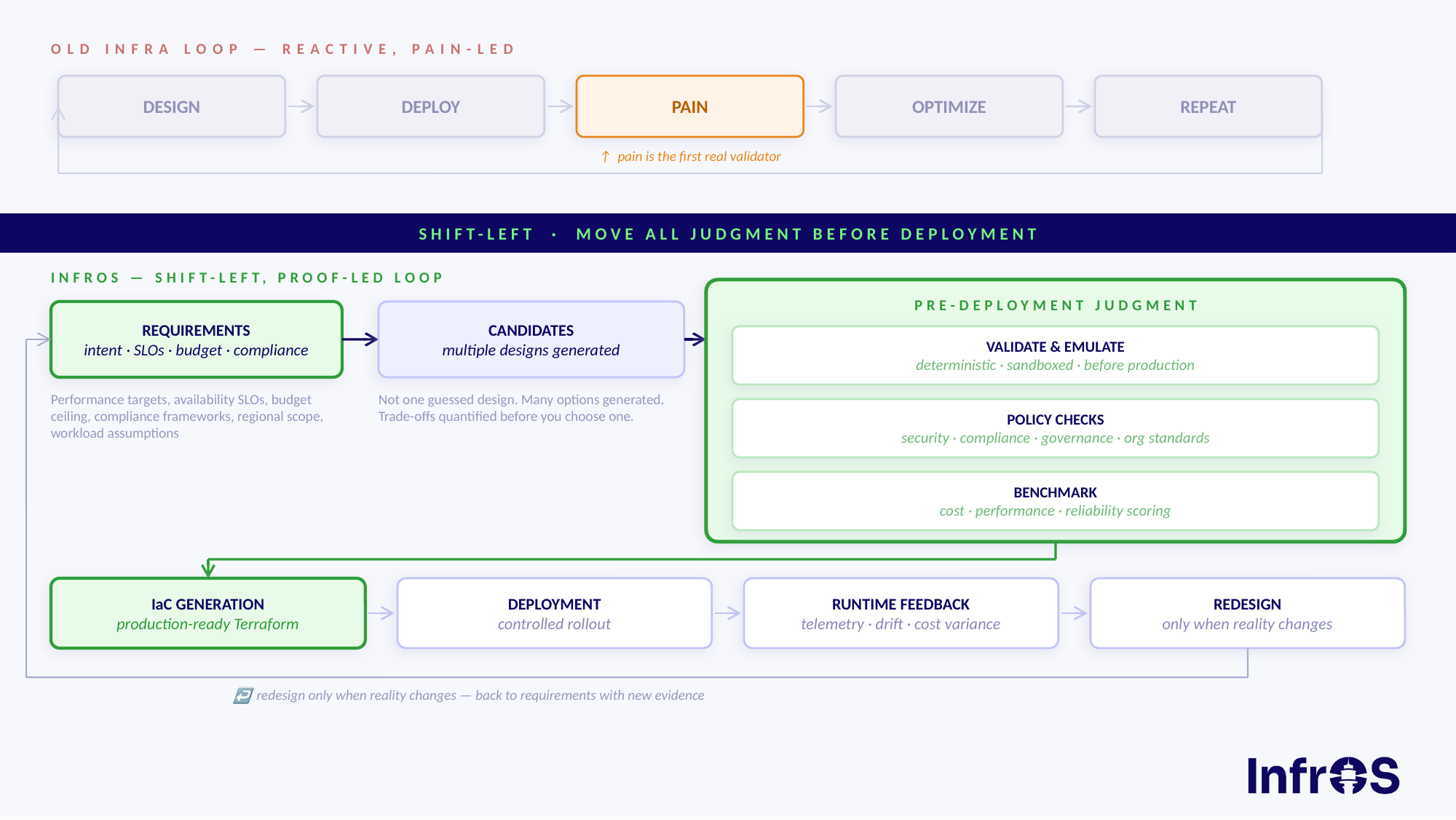
The Full Loop: From Requirements to Redesign
Most tools address one or two stages of the cloud lifecycle. InfrOS covers the entire loop — and critically, treats it as a loop, not a one-way pipeline.
1. Requirements Gathering Start with what you actually need: performance targets, budget constraints, compliance standards, regional coverage, availability requirements. These aren't afterthoughts. They're inputs. Everything else flows from them.
2. Generate Architecture Candidates Based on those requirements, InfrOS generates multiple architecture candidates — not a single opinionated default. Different trade-offs, different configurations, structured options that reflect your actual parameters: which services, which regions, which account structure.
3. Deterministic Validation and Emulation in a Sandbox This is where most tools stop short. Before anything touches production, InfrOS validates and emulates the candidate architectures in a sandboxed environment. Behavior is tested deterministically — no guessing, no "we'll see when it's live."
4. Evaluation, Policy Checks, and Benchmarking With emulation results in hand, InfrOS runs full evaluation across multiple dimensions: cost, performance, reliability, resilience, security, maintainability, and deployment complexity. Policy checks surface compliance gaps before they become audit findings. Benchmarks give you real numbers, not estimates, against your requirements.
5. Production-Ready IaC Generation Once a validated architecture clears evaluations and benchmarking, InfrOS generates production-ready Infrastructure as Code. The IaC isn't a starting point for manual editing — it's the output of a design process that's already been proven.
6. Deployment With everything validated ahead of time, deployment is a confirmation, not an experiment. You're not hoping the architecture holds up — you already know it does.
7. Runtime Feedback → Redesign When Reality Changes Live environments drift. Requirements evolve. Business context shifts. InfrOS collects runtime feedback and uses it to inform the next design cycle — which starts back at step one, but this time with real data about how the world actually behaved. That's not patching. That's InfrOS’s Evolving ArchitectureTM
Why This Matters: The Cost of Getting It Wrong After Deployment
Cloud infrastructure mistakes are expensive in two ways: the direct cost of running a misconfigured architecture, and the engineering time to diagnose and fix it. And that is without accounting for the end-user experience that might be impacted
A few data points from InfrOS deployments:
- 43% average infrastructure cost reduction when architecture is validated at design time versus post-deployment
- 63% faster deployment cycles when teams go into provisioning with proven, pre-validated designs
- Fortune 500 organizations using InfrOS have eliminated entire rounds of post-deployment rework
These aren't numbers from theoretical benchmarks. They come from real architectures that went through the shift-left process instead of the traditional deploy-and-discover approach.
This Is Not a FinOps Tool
Worth being explicit about this, because the category gets conflated constantly.
FinOps is about managing cloud spend after the fact — tagging resources, chasing anomalies, building dashboards that show you what you already spent. It's useful. It's also fundamentally reactive.
InfrOS operates across a different set of dimensions — cost, performance, resilience, security, availability, and deployment complexity — and it operates at design time, not analysis time. The goal isn't to report on what went wrong. It's to engineer something that won't.
If you're already running FinOps tooling and happy with it, InfrOS doesn't replace it. It operates upstream, at the layer where the decisions are actually made.
The Proof Is Part of the Product
"Optimized Cloud Design & Deployment. Proof Included."
That tagline isn't marketing language. It's a description of how the platform works. When InfrOS generates an architecture, the emulation results, benchmark data, and policy check reports are part of the deliverable — not an appendix, not an optional report. You deploy knowing what you're deploying and why it's the right design for your requirements.
That's the shift-left promise: by the time you hit deploy, the hard work is already done.
Who Should Be Reading This
If you're building cloud infrastructure for a company that takes reliability seriously — whether that's an engineering team at a scaling startup, a platform team at an enterprise, or an MSP managing infrastructure for clients — the shift-left model is directly relevant to you.
The teams getting the most out of InfrOS tend to share a few characteristics:
- They've been burned by post-deployment surprises before
- They're working across multiple AWS accounts, regions, or compliance frameworks
- They're responsible for both moving fast and getting it right
If that sounds familiar, the methodology is worth understanding before your next deployment cycle.
Start With Design, Not Deployment
The shift-left revolution in cloud infrastructure isn't a trend. It's a straightforward realization: the later you find a problem, the more it costs to fix it.
InfrOS exists to move that discovery earlier — all the way to the design stage, before anything is running and before any resources are provisioned against the wrong architecture.
Ready to see what your next architecture looks like before you deploy it? Request a demo today.
8 Best Cloud Cost Optimization Tools for 2026
Key Takeaways
- Multi-cloud, Kubernetes, serverless, and ephemeral infra have made cloud costs harder to track and control, leading to structural inefficiencies.
- AI is accelerating cloud cost growth and waste, increasing compute and storage demands.
- Modern cost optimization tools automate optimization through rightsizing, cleanup, scheduling, policy enforcement.
- AI is becoming the control layer for FinOps with chatbots, auto-generated dashboards, anomaly detection, “next best action” recommendations, and autonomous agents.
- Quick wins come through idle cleanup and rightsizing, but real impact comes when optimization becomes continuous and embedded in workflows.
- InfrOS delivers waste-free infrastructure, reducing the need for cost optimization cleanup.
Why Cloud Cost Optimization has Become a Priority in 2026
Cloud environments have grown significantly more complex over the past few years. Teams are now managing multi-cloud deployments, Kubernetes clusters, serverless workloads, and ephemeral infrastructure.
This sprawl leads to new cost management and optimization challenges:
- New cost variables that are difficult to understand and track manually.
- Unused resources, overprovisioned instances, and inefficient scaling policies. 25% of cloud spend is estimated to be wasted.
- Limited visibility across transient environments makes it difficult to track spend accurately, allocate costs, and identify optimization opportunities.
In addition, the growing adoption of AI agents and systems is further increasing cloud spend. Cloud compute is required for model inference, large-scale data processing and storage, continuous experimentation, and serving AI-driven features in real time. The massive resources required can quickly inflate cloud bills.
What to Look for in Cloud Cost Optimization Software
Cloud cost optimization software helps teams monitor, analyze, and reduce cloud spending through automated insights and actions. The most effective platforms go beyond dashboards and provide direct operational impact.
Here’s what to look for:
Visibility & Reporting
- Multi-cloud support (AWS, Azure, GCP) with unified dashboard
- Real-time cost monitoring and granular spend breakdowns
- Tagging and cost allocation by team, project, or environment (unit economics)
- Historical trend analysis and forecasting
Optimization Recommendations
- Rightsizing suggestions for underutilized resources
- Idle resource detection and automated cleanup
- Reserved instance / savings plan recommendations
- Spot/preemptible instance guidance
- AI-driven recommendations (not just static rules)
Automation
- Automated scheduling (e.g., shutting down dev environments at night)
- Auto-scaling policies and enforcement
- Policy-based guardrails to prevent overspending
- One-click or fully automated remediation
Budgeting & Alerts
- Custom budget thresholds per team, service, or account
- Anomaly detection with real-time alerts
- Forecasting to project end-of-month spend
Governance & Accountability
- Role-based access control
- Showback/chargeback reporting for internal billing
- Audit logs and compliance tracking
Integrations
- Native cloud billing API integrations
- Ticketing tools (Jira, ServiceNow) for remediation workflows
- FinOps/ITSM tool compatibility
- Kubernetes and container cost visibility
Ease of Use
- Quick setup with minimal configuration
- Actionable insights (not just raw data)
- Clear ROI tracking - savings achieved vs. software cost
Support & Pricing
- Transparent vendor pricing (flat fee vs. % of spend)
- Strong onboarding and customer success support
- Regular updates as cloud pricing models evolve
Best Cloud Cost Optimization Tools List for 2026
With so many cloud cost optimization tools to choose from, it might be confusing to choose the right tool for your needs. To help, we compiled a list of the top tools. They were evaluated based on automation capabilities, AI-driven insights, Kubernetes support, multi-cloud coverage, and ease of integration into engineering workflows.
1. InfrOS
InfrOS is an IT infrastructure operating system that approaches cost optimization by preventing waste before it even occurs. It focuses on designing, emulating, and validating inherently optimized architectures and architectural decisions to eliminate technical debt from the get-go.
Top Features
- Emulation and benchmarking of cloud architectures in a simulation lab
- Generation of a validated, ready-to-deploy Terraform code (IaC)
- Continuous lifecycle optimization to prevent configuration drift
- Risk-free migration planning across multi-cloud or hybrid setups.
Recommended Use Cases
Use InfrOS when you are deploying new cloud architecture or migrating systems and want to ensure you "ship right the first time" with perfectly aligned, waste-free infrastructure, or when you need to optimize existing evolving architecture and changing cloud elements.
2. ScaleOps
ScaleOps is an autonomous, real-time resource optimization platform focused on Kubernetes and AI infrastructure. It dynamically rightsizes workloads in production environments for cutting cloud costs.
Top Features
- Automated real-time pod rightsizing for CPU and memory resource requests.
- Replica optimization that dynamically manages triggers and scales
- GPU workload rightsizing, offering automated optimization for real-time demand
- Spot, Node, and Karpenter optimization to efficiently utilize nodes and eliminate underutilized capacity.
Recommended Use Cases
Choose ScaleOps when you are looking for an autonomous solution for your K8s and AI infrastructure.
3. Cast AI
Cast AI is an application performance automation platform for Kubernetes and cloud applications. It proactively rightsizes workloads and manages infrastructure to improve performance and shrink costs.
Top Features
- Self-healing AI Agents that remediate drift and automatically fix operational issues without tickets.
- Precision workload rightsizing for CPU and memory requests.
- Infrastructure automation including GPU allocation, node scaling, and intelligent workload placement.
- Spot instance interruptions predictions
Recommended Use Cases
Choose Cast AI for use cases requiring autonomous solutions for K8s and app performance and when using Spot instances.
4. OpenOps
OpenOps is a no-code, open-source FinOps automation solution that helps organizations connect their existing visibility tools and multi-cloud environments so they can create optimization and remediation workflows.
Top Features
- No-code customizability with unlimited steps, conditional branching, and thresholds to build workflows from scratch.
- Pre-packaged workflows for top FinOps domains
- Multiple integrations with public clouds, FinOps tools, DevOps tools, and communication platforms.
- Human-in-the-loop approvals to streamline feedback loops and avoid blind automation.
Recommended Use Cases
Choose OpenOps if you are a FinOps practitioner who needs highly customizable workflows without wanting to write code, and you need to maintain tight governance.
5. PointFive
PointFive provides deep waste detection and agentic remediation for cloud and AI efficiency.
Top Features:
- DeepWaste Detection featuring over 400 optimization types across AWS, Azure, GCP, Kubernetes, Snowflake, Databricks, and more.
- Agentic Remediation, where AI coding agents generate contextual IaC fixes
- Optimization for AI, analyzing GPU instance rightsizing, model selection, prompt caching, and provisioned throughput.
- Workflow automation routing tasks via Jira, Slack, or ServiceNow to accelerate resolution.
Recommended Use Cases
Use PointFive when you need to uncover deep architectural waste (including complex AI infrastructure costs) and want to speed up implementation by providing your engineers with ready-to-deploy IaC fixes directly in their workflows.
6. IBM Turbonomic
IBM Turbonomic is an application resource management platform for hybrid and multicloud environments. It optimizes compute, storage, and network resources to real-time, for optimizing performance.
Top Features
- Full-stack visibility that continuously analyzes applications, VMs, containers, and infrastructure to map resource flows and dependencies.
- Policy-driven automation for executing safe, auditable actions
- Rightsizing compute, storage, network and GPU resources based on live demand.
- Data center, Kubernetes, and cloud optimization.
Recommended Use Cases
Choose IBM Turbonomic if you’re a large enterprise with a complex hybrid IT infrastructures(mixing on-premises data centers, VMs, and multicloud environments).
7. Harness
Harness provides an AI-powered FinOps tool that provides recommendations, reports and answers to natural language questions.
Top Features
- Reporting and visibility for cost allocation, kubernetes, chargeback/showback and anomaly detection.
- Automated surfacing of insights and optimization opportunities.
- Automated policy creation and remediation
- AutoStopping of idle resources
- Commitment Orchestrator for automated purchasing and management of Instances
- Cluster Orchestrator for autoscaling with spot orchestration and bin packing
Recommended Use Cases
Use Harness when you want to rely on AI for cost optimization management
8. Wiv
Wiv is an AI-powered FinOps workflow automation platform that provides cloud cost optimization recommendations and uses conversational AI to automate routines and enforce governance.
Top Features
- AI FinOps agent, which learns business context, alerts teams to cost spikes, and answers cost questions in natural language.
- Low-code or natural language options for building tailored optimization workflows.
- Advanced filtering options for case management
- Human-in-the-loop approvals
- Real-time dashboards
Recommended Use Cases
Choose Wiv if you’re looking for a no-code interface and an AI copilot for building and enforcing your workflows.
How AI Tools are Changing Cloud Cost Optimization
AI tools for cloud cost optimization use ML models, LLMs and MCP servers to automate and enhance and deliver cost optimization workflows. These systems continuously learn from workload behavior to predict usage, identify anomalies and adjust rightsizing recommendations over time. They can reduce cloud costs by 15-35% through real-time alerts and recommendations, with tools like InfrOS reducing costs by 43% as well as time to deployment.
With AI in cloud cost optimization, teams can:
- Automate rightsizing recommendations - Continuously analyze resource utilization and suggest or automatically apply optimal instance types and sizes, eliminating manual guesswork
- Predict and prevent cost spikes - Use forecasting models to anticipate usage surges before they occur, enabling proactive budget controls rather than reactive fixes
- Detect anomalous spending in real time - Identify unusual cost patterns the moment they emerge, reducing the window between a misconfiguration and its financial impact
- Optimize reserved instance and savings plan coverage - Analyze historical usage trends to recommend the right mix of commitment-based pricing, maximizing discounts without over-committing
- Eliminate idle and zombie resources - Surface underutilized VMs, orphaned snapshots, and forgotten storage buckets that accumulate costs silently over time
- Accelerate FinOps workflows - Reduce the manual effort of tagging audits, cost allocation, and reporting, freeing engineers to focus on higher-value work
- Improve multi-cloud visibility - Consolidate spending insights across AWS, Azure, and GCP into unified recommendations, making cross-cloud tradeoffs easier to evaluate
- Answer cost questions via chatbot - Allow teams to ask natural language questions like “Why did spend spike yesterday?” and get immediate, contextual answers
- Generate dashboards on demand - Turn prompts into real-time cost views, breaking down spend by service, team, or workload without manual setup.
- Recommend next best actions - Go beyond insights to suggest exactly what to do next, from shutting down resources to changing pricing models.
- Operationalize MCP integrations - Connect AI agents to cloud and FinOps systems through MCP to take action (e.g. resize instances, apply policies) directly from insights
- Unify context across tools - Pull data from billing, observability, and infra into a single ai-driven view, reducing fragmentation and decision latency
FAQs
How do cloud cost optimization tools differ from FinOps platforms?
Cloud cost optimization tools focus on identifying and reducing infrastructure waste through automation and technical insights. FinOps platforms guide decision-making and budgeting by connecting spend to business units, enforcing policies, forecasting usage, and enabling teams to track unit economics and ROI.
Are cloud cost optimization solutions safe for production workloads?
Most modern solutions are designed with safeguards such as approval workflows, policy controls, and rollback mechanisms to ensure safe operation in production. Teams can configure automation levels, starting with recommendations before enabling execution, minimizing the risk of performance impact or unintended disruptions.
Can cloud cost optimization software support Kubernetes environments?
Yes, many modern tools provide Kubernetes-native support, offering visibility into pod-level costs, idle resources, and cluster efficiency. They also deliver rightsizing recommendations and workload optimization strategies specifically tailored to containerized environments, which are now central to most cloud architectures.
How quickly can teams see ROI from cloud cost optimization services?
Teams often begin seeing measurable savings within weeks, especially when addressing obvious inefficiencies like idle resources or overprovisioned instances. Full ROI typically depends on adoption depth, but organizations that integrate optimization into engineering workflows can achieve continuous and compounding cost reductions.
Do AI-powered tools replace manual infrastructure optimization?
AI-powered tools significantly reduce the need for manual optimization by automating analysis and remediation, but they do not fully replace human oversight. Engineers are still responsible for defining policies, validating changes, and aligning optimization efforts with performance, reliability, and business requirements.