



The Business Challenge
A CIO at a large enterprise reached out with a problem I hear often. Their cloud costs were climbing, but they had no budget to hire a dedicated FinOps team or to pay for one of the expensive SaaS cost-management platforms on the market.
Their engineering, cloud operations, and SRE teams needed a simple way to understand where the money was going, spot optimization opportunities, and get clear recommendations, without anyone having to become a FinOps specialist first. The request was direct:
“Can we build an AI assistant that understands our cloud environment, answers questions about our costs in plain language, and tells us how to reduce spending whenever the teams need it?”
That question is what led me to build a Cost Optimization Agent on AWS: a conversational interface that lets any engineer ask about cloud spend, see where it is going, and get specific actions to bring it down.
What I Built
The agent answers questions like “Are my costs higher than usual this month?” or “How can I reduce my Lambda spend?” and replies with an analysis and concrete recommendations. It is a single-agent design built from a few clear parts:
- Claude Sonnet, served through Amazon Bedrock: the model that interprets the question and reasons over the cost data it gets back.
- Amazon Bedrock AgentCore Runtime: hosts the agent in production and runs its reasoning-and-tool-selection loop, with auto-scaling, session isolation, and monitoring handled for me.
- Amazon Bedrock Guardrails: content filtering on both the user input and the model output that keeps conversations inside the FinOps scope, blocks prompt injection, and prevents sensitive data from leaking.
- A set of cost-intelligence tools: each function calls an AWS cost or monitoring API: Cost Explorer, AWS Budgets, Amazon CloudWatch, and AWS Compute Optimizer.
- A production front door and supporting services: Amazon API Gateway and Amazon Cognito for access, Amazon DynamoDB for conversation context, and Amazon SNS for proactive alerts.
I started from the AWS reference implementation in the awslabs agentcore-samples repository, which gave me the core agent and its cost tools. On top of that, InfrOS — a platform that turns requirements in any form (a simple brief, PRD, design doc, TF, HLD diagram etc.) into a priced, validated cloud design — worked out the production architecture around it, adding the pieces a real deployment needs:
- The API Gateway and Cognito front door
- DynamoDB session persistence
- SNS alerting
- Compute Optimizer as a rightsizing source
so the result is a production setup for the customer rather than the sample running as is. The architecture behind it was designed, priced, and validated with InfrOS: it scored the component options across the priority dimensions, priced each one across on-demand, reserved, and spot, then generated the IaC and emulated it in a sandbox, benchmarking the design against the requirements before any of it reached a real AWS account. What would otherwise take an architect weeks came back as a validated, deployable blueprint in a single session.
Architecture
The system runs in us-east-1 and is organized into three layers. The first is the user interaction layer: engineers type their questions into a lightweight web chat UI whose requests arrive through Amazon API Gateway, where Amazon Cognito authenticates the user, Amazon DynamoDB stores and retrieves the conversation context so sessions persist, and Amazon SNS delivers proactive alerts. The second is the agent core: AgentCore Runtime hosts the agent and runs its reasoning loop with the Claude Sonnet model. The third is the cost-intelligence tools, which read from AWS Cost Explorer, AWS Budgets, Amazon CloudWatch, and AWS Compute Optimizer. Rather than running in the organization's management (payer) account, which AWS recommends reserving for org-wide administration rather than for hosting workloads, the agent runs in a dedicated FinOps tooling account. That account is registered as the delegated administrator for AWS Compute Optimizer and is granted scoped, read-only access to organization-wide Cost Explorer data, so it still reads consolidated cost and rightsizing data across every linked account at the organization level without placing an internet-facing workload in the most sensitive account in the organization. AWS Budgets sits in the global scope rather than the Region, since budgets are account wide.
Amazon Bedrock plays two distinct roles in the design, worth separating because the service name is the same in both. One role is Guardrails, filtering the conversation on the way in and on the way out; the other is the model endpoint that serves Claude Sonnet for the agent’s reasoning. Same service, two different jobs.
The agent itself is inexpensive to run about $479 a month against the customer’s $1,500 budget. For a FinOps tool, the interesting detail is that roughly 86% of that ($412) is the Claude Sonnet inference, not the surrounding infrastructure. The model is the cost to watch, which is a point I come back to under future work.
Architecture Decisions
Each part of the design was a deliberate choice that InfrOS evaluated and scored against the priority profiles, and the trade-offs are worth spelling out. Here is the reasoning behind the main ones.
Why AgentCore Runtime?
The customer wanted a production agent, not a prototype, but had no appetite for managing the infrastructure under it. AgentCore Runtime handles auto-scaling, monitoring, and session isolation, and it deploys through the AgentCore starter toolkit, which provisions the runtime, the IAM execution role, and the container image for you. Session isolation matters when several engineers query cost data at once meaning each conversation stays separate. Using AgentCore Runtime, rather than the managed Agents for Amazon Bedrock feature, kept the agent code under our control while still getting managed hosting.
Why Claude Sonnet?
This agent leans on two things: understanding loosely worded cost questions in plain English, and reasoning over structured billing data to produce a clear recommendation with the trade-offs spelled out.
Claude Sonnet is strong at both, and its reliability at choosing the right tool from the catalog kept the loop accurate. Serving it through Amazon Bedrock also kept the model inside the customer’s AWS account and security boundary, which was a requirement.
So why Guardrails?
A cost assistant should only ever talk about costs. Amazon Bedrock Guardrails enforce that topic boundary on both the user input and the model output, block prompt-injection attempts, and stop sensitive data such as access keys or PII from appearing in a response. Putting safety in a managed, declarative layer kept it separate from the agent logic and applied it consistently to every query.
How It Works
A request follows the same numbered path every time, shown end to end below.
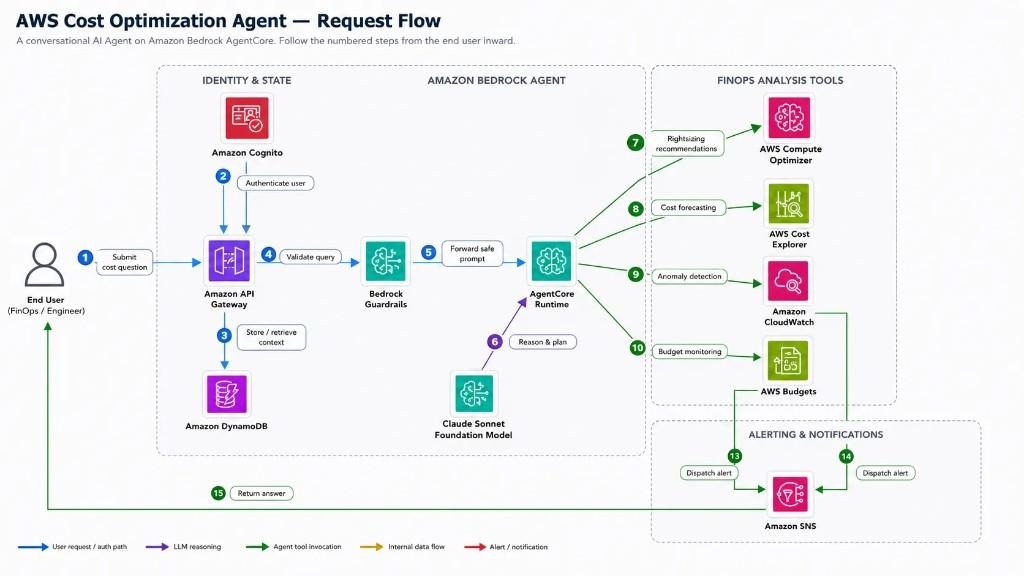
- An engineer submits a cost question through Amazon API Gateway.
- Amazon Cognito authenticates the request.
- DynamoDB stores or retrieves the conversation context, so a follow-up keeps its thread.
- Bedrock Guardrails validate the query, dropping anything off-topic or unsafe.
- The safe prompt is forwarded to AgentCore Runtime, where the agent reasons with the Claude Sonnet foundation model and decides which tools to call:
- Rightsizing recommendations from AWS Compute Optimizer.
- Cost forecasting from AWS Cost Explorer.
- Anomaly detection from Amazon CloudWatch.
- Budget monitoring from AWS Budgets.
- When something needs attention, CloudWatch and Budgets dispatch alerts through Amazon SNS.
- The synthesized answer is returned to the engineer.
The agent does not run a fixed script; the model chooses which tools to call based on the question and may call several before answering.
The four cost tools map directly to AWS APIs:
- Cost Anomaly Detection: unusual spending patterns and spikes, detected with Amazon CloudWatch anomaly detection over cost metrics published from Cost Explorer, with alerts dispatched over SNS.
- Cost Forecasting and Trend Analysis: projected spend and historical trends from AWS Cost Explorer.
- Service Cost Breakdown: spend by service, account, and resource, combining AWS Compute Optimizer rightsizing data with Cost Explorer to flag unused, underutilized, and oversized resources.
- Budget Monitoring and Status: utilization and overrun forecasts from AWS Budgets, with alerts dispatched over SNS.
Infrastructure and Deployment
The agent deploys through the AgentCore starter toolkit, wrapped by the repository’s scripts. After cloning the reference repository and installing dependencies, there are three steps, test locally, deploy, then test the deployed agent against live cost data:
The deploy step calls the starter toolkit, which builds the container image, creates the IAM execution role and ECR repository, and registers the runtime so the agent itself does not need a hand-written infrastructure module. The supporting resources around it (API Gateway, Cognito, DynamoDB, SNS, the Guardrail, and the budget) are defined in Terraform so they are version-controlled and repeatable. The Guardrail, for example, is a short block that also blocks prompt-injection attempts and stops AWS keys from ever appearing in a response:
The Outcome
Before any production rollout, we ran the agent against the customer’s dev and test AWS environment three linked accounts with about $1,012 of spend over the previous 30 days (a window that straddled April and May) to see what it would find. This is the summary it returned:

In a single run it flagged a $115.38 anomaly (EKS extended support, billed April 19–26) and forecast May at $1,023.76, up 13.3% on the full April calendar month of about $904. The $1,012.38 headline is the trailing-30-day total, which runs higher than the April calendar month because that window also caught the EKS spike. Against that roughly $1,012 monthly run rate it identified $369 a month in savings: a 36.5% reduction worth about $4,428 a year.
To be precise, that is spend the agent recommended cutting rather than money already removed, and on a roughly $1,000-a-month sandbox the $4,428-a-year figure is a proof of capability more than an ROI case: at $479 a month the agent would cost more to run than that. What mattered in the pilot was that it surfaced this much on a tiny environment in a single run, as a summary panel alongside its conversational answers. The ROI argument sits with the production rollout below, where the same engine runs against a far larger bill.
On the strength of that pilot the customer moved the agent into production. Within the first few months, the changes the engineers acted on added up to roughly a 12% reduction in the monthly bill. A good part of that came from one early find: an oversized Amazon RDS instance that Compute Optimizer flagged for rightsizing, alongside a handful of EC2 instances the team had spun up for a project and left running for months after they stopped using them.
The agent surfaced both in response to a plain question about where the months spend was going, the kind of thing that usually hides in a billing console until someone goes looking.
Just as important was the change in who could ask cost questions and how fast. Engineers no longer waited on a central team or a paid dashboard; they asked in plain language and got an answer with a recommended action, so cost awareness happened during day to day work instead of in a monthly review. Against the production bill, the roughly $479-a-month agent cost a small fraction of the 12% it helped remove, and it met the original constraint of meaningful FinOps coverage without a dedicated team or a third-party platform, which was the whole reason the CIO called in the first place.
Further Improvements and Architecture Vision
The clearest piece of the architecture vision is memory. Today Amazon DynamoDB stores and retrieves the conversation context, which means I am managing session state, retrieval, and expiry myself. I plan to replace it with Amazon Bedrock AgentCore Memory, which provides short-term memory for the active session and long-term memory that persists across sessions as a native capability of the runtime already hosting the agent. That removes a hand-managed store and lets the platform handle what it is built for the same reasoning behind choosing AgentCore Runtime in the first place. DynamoDB would only stay if there were structured, non-conversational records worth keeping.
Conclusion
The Cost Optimization Agent took a request that usually ends in a hire or a software purchase and answered it with a small, focused build instead. Claude Sonnet through Amazon Bedrock supplies the reasoning, Bedrock Guardrails keep it safe and on topic, AgentCore Runtime hosts it and runs the tool loop, and a set of cost tools connect it to Cost Explorer, Budgets, CloudWatch, and Compute Optimizer with API Gateway, Cognito, DynamoDB, and SNS making it a real deployment. The pattern is reusable: give a model a clear set of narrow tools and a safe runtime, and you can put a useful assistant in front of a problem that used to need a whole team. And the build itself was just as lean: InfrOS turned what would have been weeks of architecture work into a single session, exploring and scoring the options and handing back a priced, validated, IaC-ready design.